Work

Inventory Management

ServiceChannel | Design Lead |

Desktop & Mobile

As design lead, I oversaw the design of ServiceChannel's Inventory Management module for desktop and mobile, collaborating with product management and development teams. I designed the desktop experience and guided the mobile design to ensure alignment. Leading the strategic vision and providing feedback throughout iteration, I delivered a modern solution comprising over 100 screens.

What is Inventory Management?

The Inventory Management is a central pillar of the ServiceChannel Product system. It enables facility managers (desktop) and technicians (mobile) to track and request materials across locations, ensuring related facilities operate without disruption.

Purchase

Request new and restock parts based minimum stock levels.

Distribute

Track parts as they are transferred between locations.

Manage

Track inventory across warehouses, trucks, and retail locations.

Who Uses Inventory Management?

Inventory Manager

  • Manages inventory across multiple locations
  • Monitors inventory levels
  • Tracks who uses what parts and where
  • Assures field technicians have necessary inventory
  • Assure that parts a delivered/transferred on time

Field Technician

  • Performs maintenance on store locations
  • Responsible inventory in their truck
  • Invoices parts to work orders
  • Create/tracks part requisitions
  • Transfer parts between warehouse to truck and truck to truck

How is Inventory Management Used?

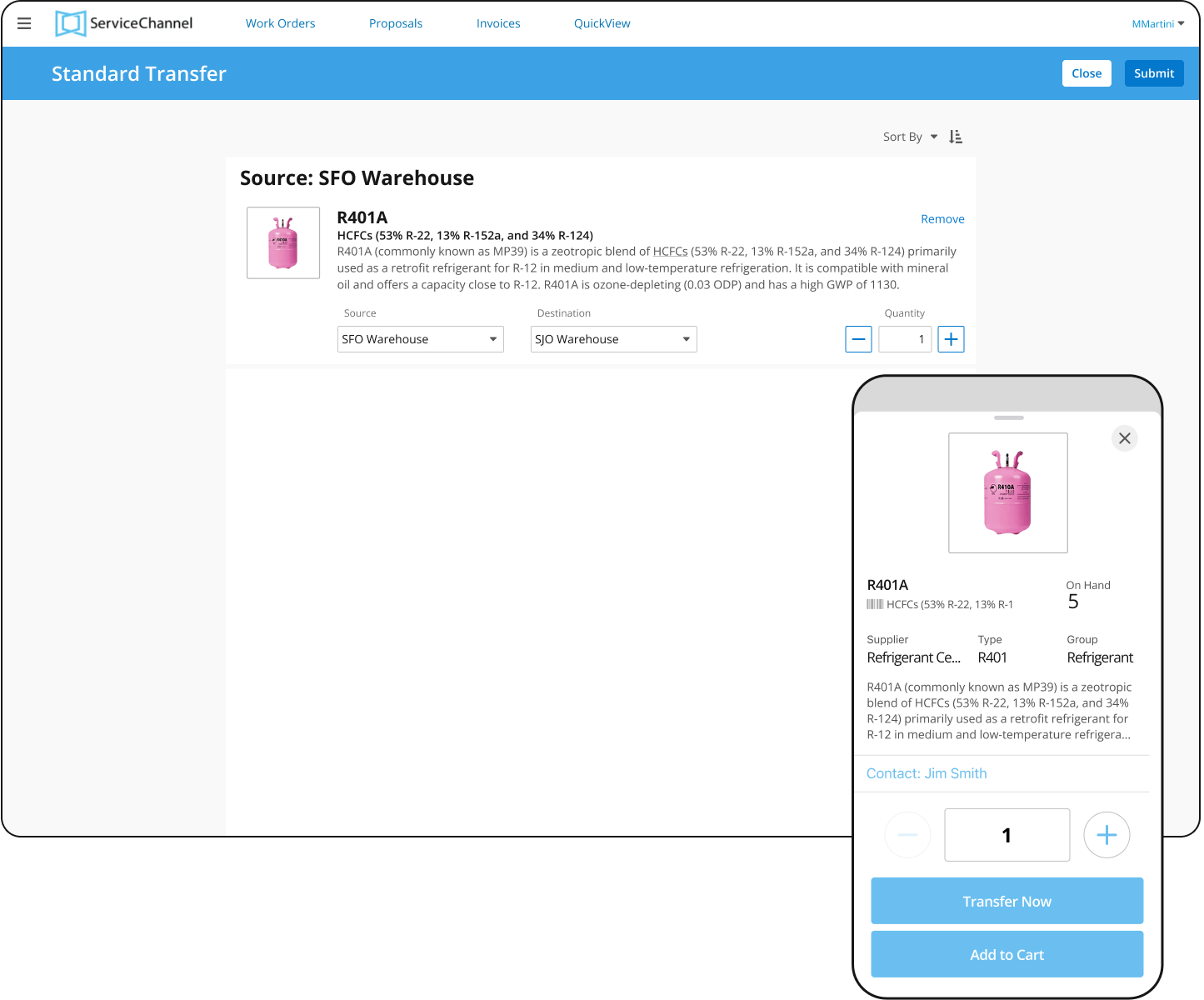
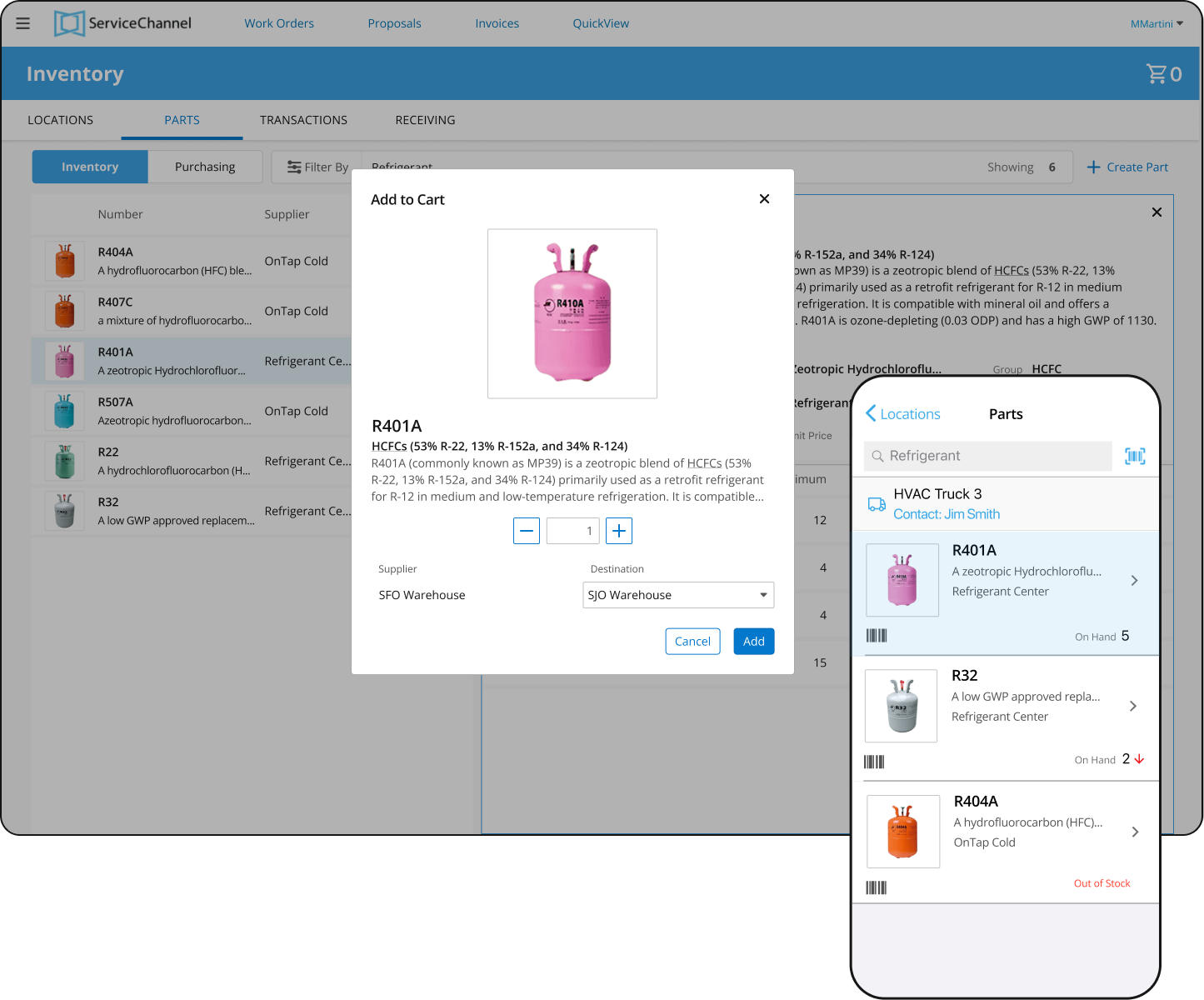
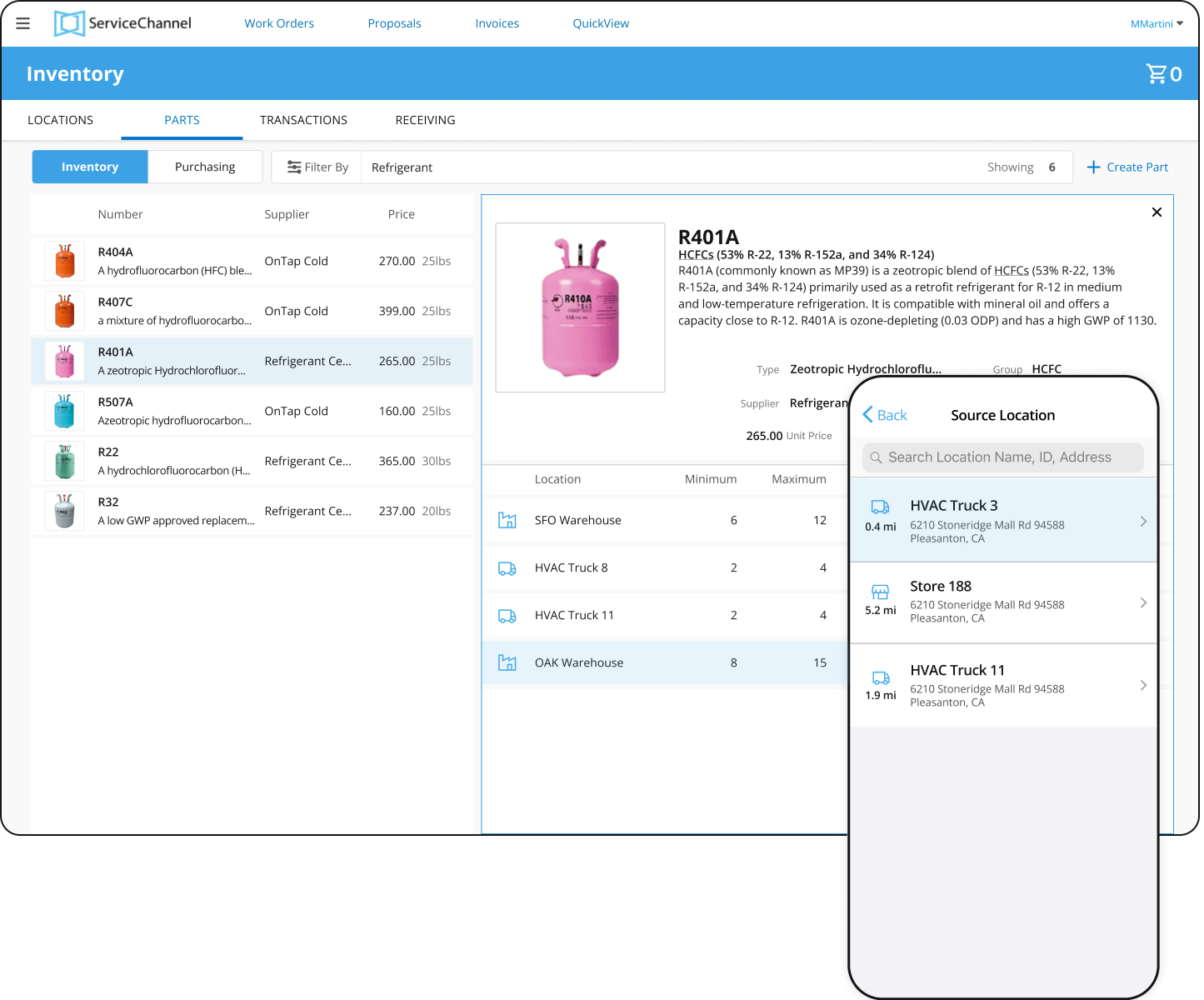
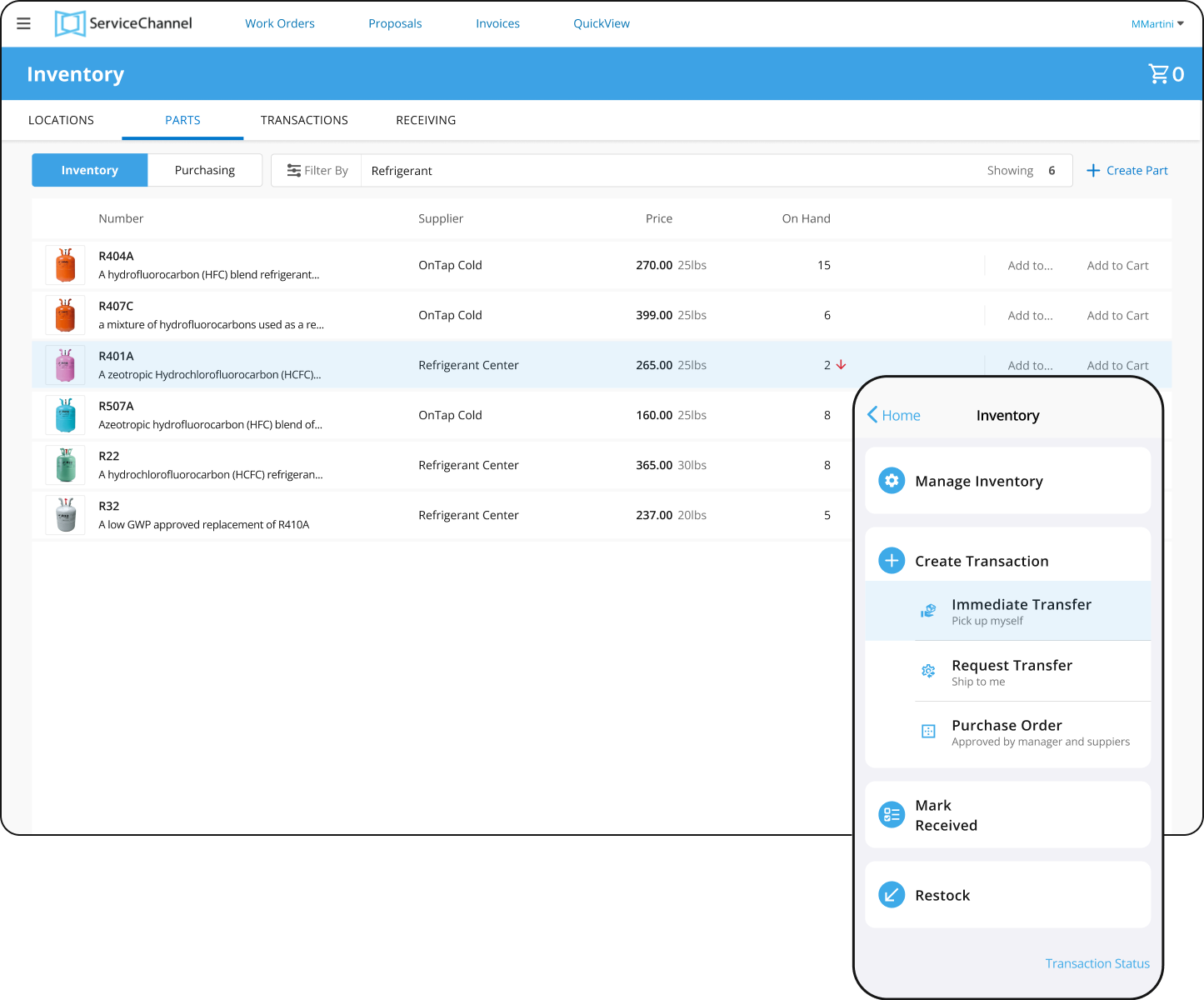
This scenarios highlight the two use cases for transferring refrigerant from one inventory location to another. Though users are transferring refrigerant, the device, circumstance, and environment they are performing the task are different.

Scenario:Transfer Part

Use Case


The Inventory Manager needs to transfers refrigerant from one inventory location to another to assure it does not fall below minimums.


After repairing a refrigeration system a Field Technician does not have enough refrigeration to recharge the system so they need to create an inventory transfer.

Challenges

Product team had no prior experience working with UX designers

Formally introduced team to design methodologies and demonstrated how design would integrate into the team

Develop product knowledge quickly

Conducted extensive discovery sessions to create scenarios and user journeys before beginning design

Simultaneously designing desktop and mobile app

Align the desktop and mobile applications to suit each device's specific use case


Limited access to users and customers for research and feedback

Leveraged the product team's domain expertise and drew on the design team’s experience


Process

I collaborated closely with the mobile app designer to build a unified design vision for both desktop and mobile. Despite different users and use cases across platforms, we maintained consistency wherever possible. Together, we developed personas, requirements, and user stories to guide our design solutions.

User Journeys

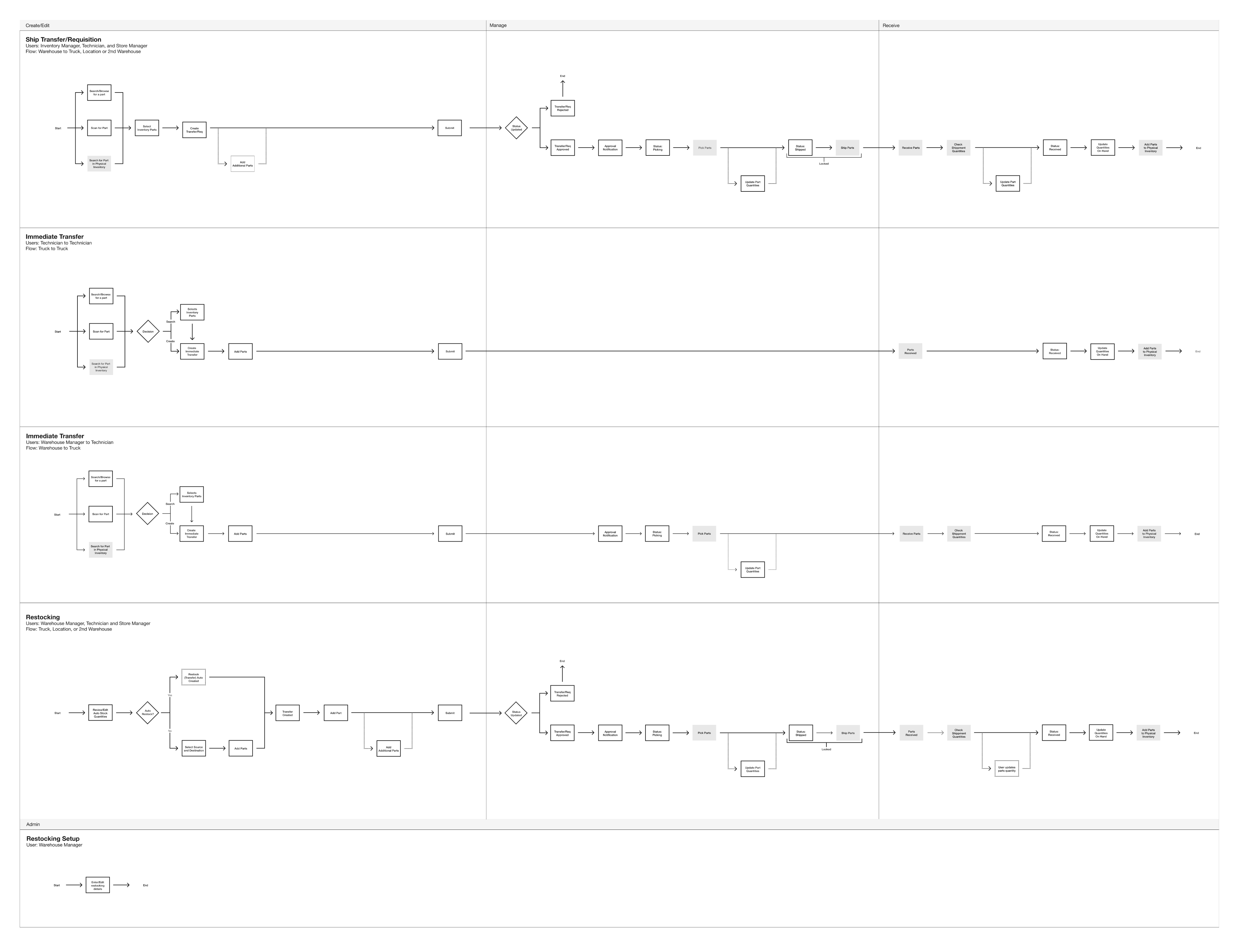
Before design started the team and I worked closely with the Product Management and Development teams to map out the desktop and mobile user journeys.  


    • Ship, Transfer, and Requisition - Desktop & Mobile
    • Immediate Transfer - Mobile Only
    • Restocking - Desktop & Mobile


These journeys helped us to understand what the primary focus of the product and the tasks a user performs based upon whether they are using the desktop or mobile product.  

Lifecycle

During design process, the team worked with Product Management and Development to map out the statuses and phases a product moves through to enter the Inventory Management System.


The mapping gave the team a clear visualization of how the Inventory Manager and the Technician interact with the product and the inventory being managed.

Deliverables

The final desktop and mobile designs were created using Figma and were delivered simultaneously to development. Throughout the final design process the design team members collaborated closely to assure terminology, style, and behaviors aligned across desktop and mobile. 

© John Stickley 2025 All Rights Reserved - v26

Work

John Stickley

Inventory Management

ServiceChannel | Design Lead | Desktop & Mobile

As design lead, I oversaw the design of ServiceChannel's Inventory Management module for desktop and mobile, collaborating with product management and development teams. I designed the desktop experience and guided the mobile design to ensure alignment. Leading the strategic vision and providing feedback throughout iteration, I delivered a modern solution comprising over 100 screens.

What is Inventory Management?

The Inventory Management is a central pillar of the ServiceChannel Product system. It enables facility managers (desktop) and technicians (mobile) to track and request materials across locations, ensuring related facilities operate without disruption.

Purchase

Request new and restock parts based minimum stock levels.

Distribute

Track parts as they are transferred between locations.

Manage

Track

inventory across warehouses, trucks, and retail locations.

Who Uses Inventory Management?

Inventory Manager

  • Manages inventory across multiple locations
  • Monitors inventory levels
  • Tracks who uses what parts and where
  • Assures field technicians have necessary inventory
  • Assure that parts a delivered/transferred on time

Field Technician

  • Performs maintenance on store locations
  • Responsible inventory in their truck
  • Invoices parts to work orders
  • Create/tracks part requisitions
  • Transfer parts between warehouse to truck and truck to truck

How is Inventory Management Used?

This scenarios highlight the two use cases for transferring refrigerant from one inventory location to another. Though users are transferring refrigerant, the device, circumstance, and environment they are performing the task are different.

Use Case

The Inventory Manager needs to transfers refrigerant from one inventory location to another to assure it does not fall below minimums.


After repairing a refrigeration system a Field Technician does not have enough refrigeration to recharge the system so they need to create an inventory transfer.

Scenario:Transfer Part

Challenges

Product team had no prior experience working with UX designers

Formally introduced team to design methodologies and demonstrated how design would integrate into the team

Develop product knowledge quickly

Conducted extensive discovery sessions to create scenarios and user journeys before beginning design

Simultaneously designing desktop and mobile app

Align the desktop and mobile applications to suit each device's specific use case


Limited access to users and customers for research and feedback

Leveraged the product team's domain expertise and drew on the design team’s experience


Process

I collaborated closely with the mobile app designer to build a unified design vision for both desktop and mobile. Despite different users and use cases across platforms, we maintained consistency wherever possible. Together, we developed personas, requirements, and user stories to guide our design solutions.

User Journeys

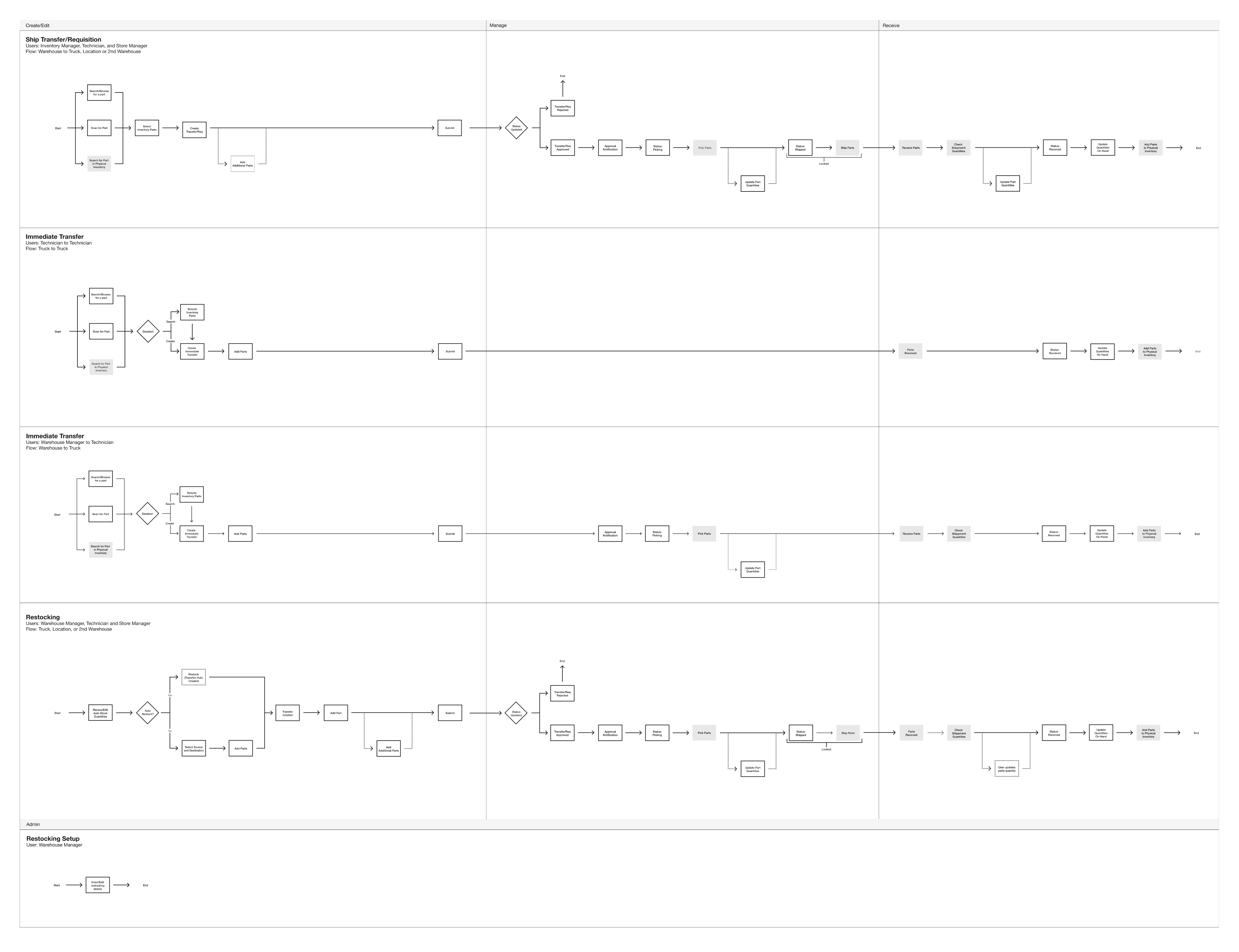
Before design started the team and I worked closely with the Product Management and Development teams to map out the desktop and mobile user journeys.  


    • Ship, Transfer, and Requisition - Desktop & Mobile
    • Immediate Transfer - Mobile Only
    • Restocking - Desktop & Mobile


These journeys helped us to understand what the primary focus of the product and the tasks a user performs based upon whether they are using the desktop or mobile product.  
Lifecycle

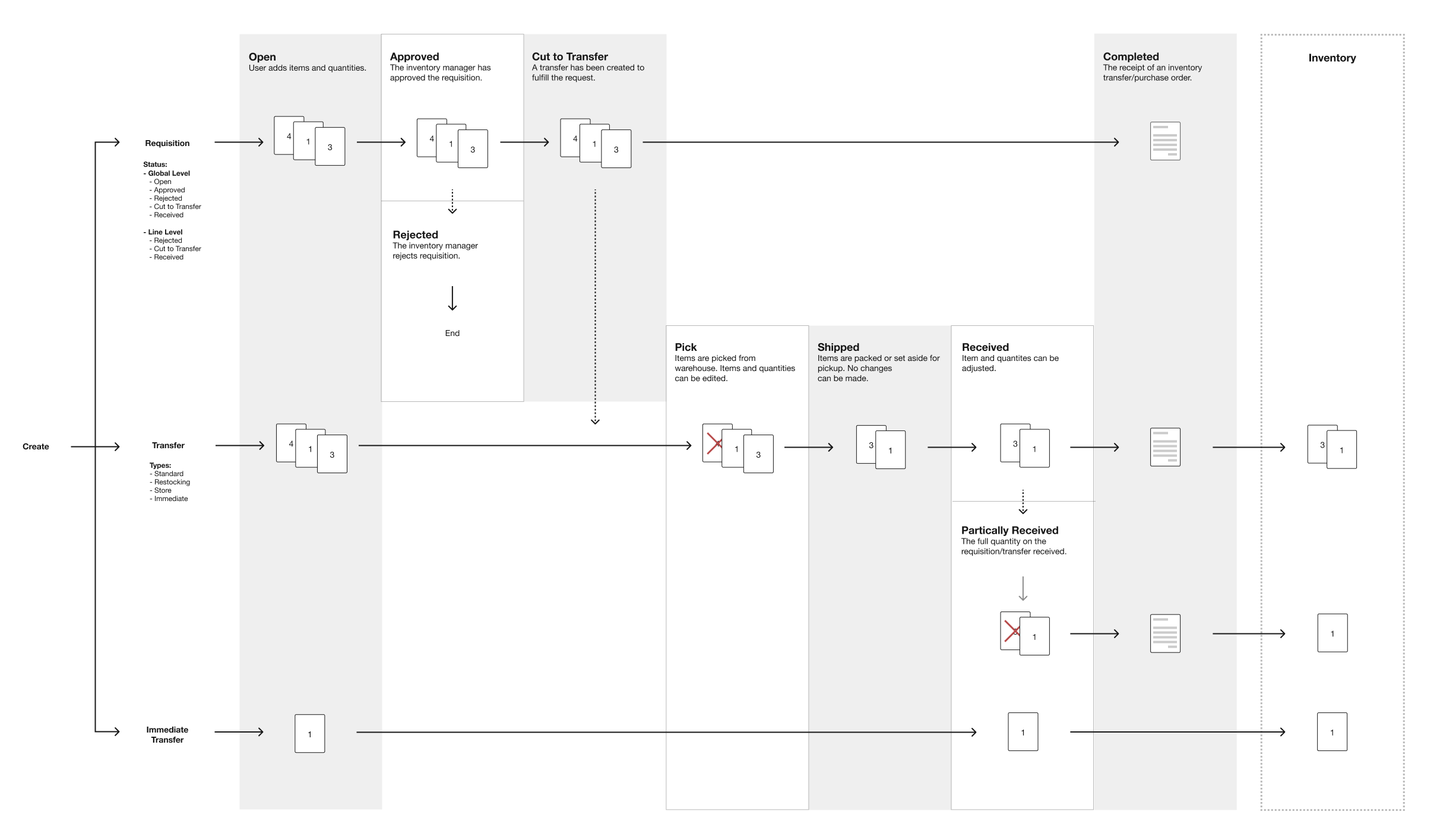
During design process, the team worked with Product Management and Development to map out the statuses and phases a product moves through to enter the Inventory Management System.


The mapping gave the team a clear visualization of how the Inventory Manager and the Technician interact with the product and the inventory being managed.
Deliverables

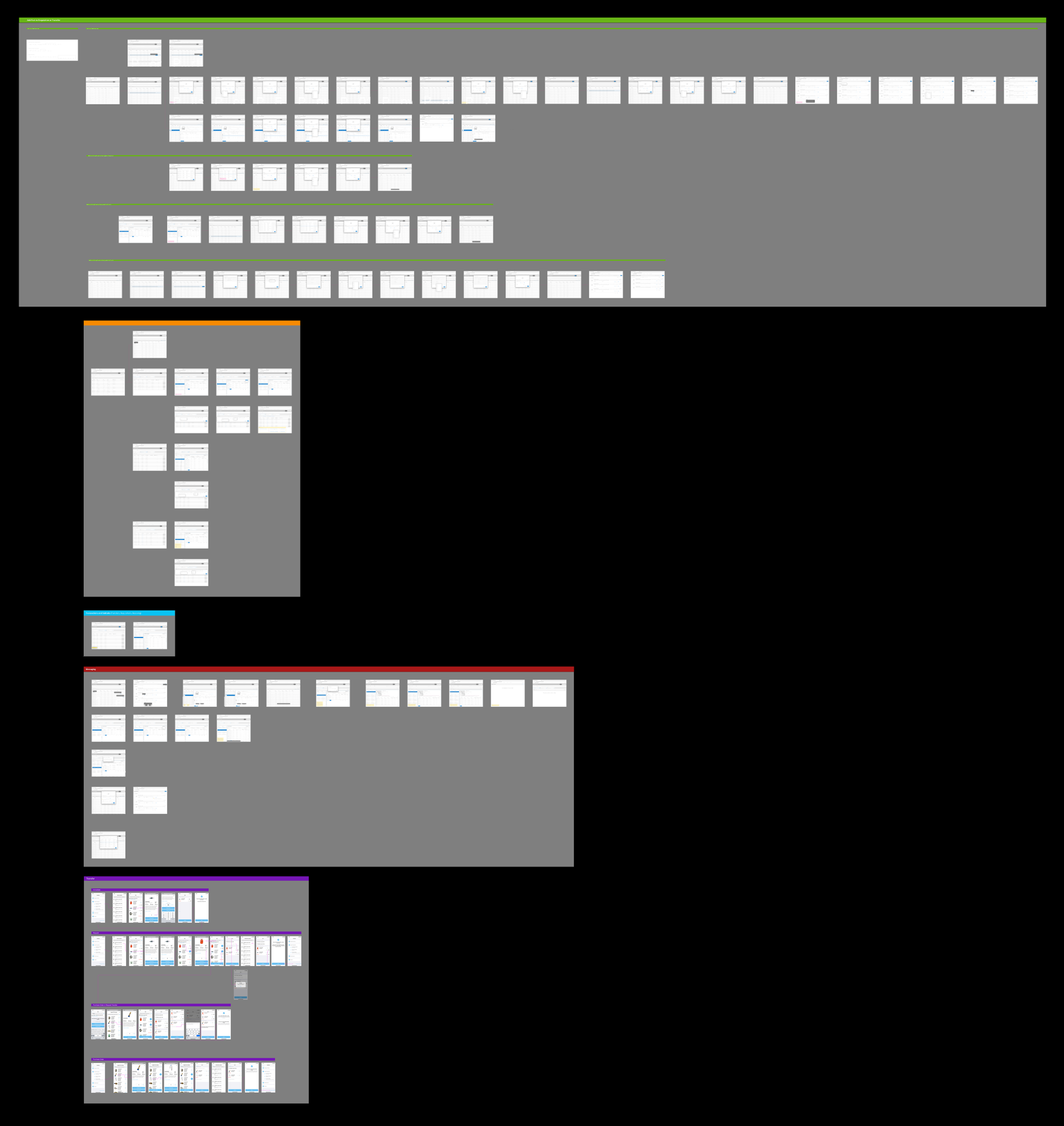
The final desktop and mobile designs were created using Figma and were delivered simultaneously to development. Throughout the final design process the design team members collaborated closely to assure terminology, style, and behaviors aligned across desktop and mobile. 
Work

John Stickley

Inventory Management

ServiceChannel | Design Lead | Desktop & Mobile

As design lead, I oversaw the design of ServiceChannel's Inventory Management module for desktop and mobile, collaborating with product management and development teams. I designed the desktop experience and guided the mobile design to ensure alignment. Leading the strategic vision and providing feedback throughout iteration, I delivered a modern solution comprising over 100 screens.

What is Inventory Management?

The Inventory Management is a central pillar of the ServiceChannel Product system. It enables facility managers (desktop) and technicians (mobile) to track and request materials across locations, ensuring related facilities operate without disruption.

Purchase

Request new and restock parts based minimum stock levels.

Distribute

Track parts as they are transferred between locations.

Manage

Track inventory across warehouses, trucks, and retail locations.

Who Uses Inventory Management?

Inventory Manger

  • Manages inventory across multiple locations
  • Monitors inventory levels
  • Tracks who uses what parts and where
  • Assures field technicians have necessary inventory
  • Assure that parts a delivered/transferred on time

Field Technician

  • Performs maintenance on store locations
  • Responsible inventory in their truck                             
  • Invoices parts to work orders
  • Create/tracks part requisitions
  • Transfer parts between warehouse to truck and truck to truck

How is Inventory Management Used?

This scenarios highlight the two use cases for transferring refrigerant from one inventory location to another. Though users are transferring refrigerant, the device, circumstance, and environment they are performing the task are different.

Use Case

The Inventory Manager needs to transfers refrigerant from one inventory location to another to assure it does not fall below minimums.


After repairing a refrigeration system a Field Technician does not have enough refrigeration to recharge the system so they need to create an inventory transfer.

Scenario: Transfer Part

Challenges

Product team had no prior experience working with UX designers

Formally introduced team to design methodologies and demonstrated how design would integrate into the team

Develop product knowledge quickly

Conducted extensive discovery sessions to create scenarios and user journeys before beginning design

Simultaneously designing desktop and mobile app

Align the desktop and mobile applications to suit each device's specific use case


Limited access to users and customers for research and feedback

Leveraged the product team's domain expertise and drew on the design team’s experience


Process

I collaborated closely with the mobile app designer to build a unified design vision for both desktop and mobile. Despite different users and use cases across platforms, we maintained consistency wherever possible. Together, we developed personas, requirements, and user stories to guide our design solutions.

User Journeys

Before design started the team and I worked closely with the Product Management and Development teams to map out the desktop and mobile user journeys.  


    • Ship, Transfer, and Requisition - Desktop & Mobile
    • Immediate Transfer - Mobile Only
    • Restocking - Desktop & Mobile


These journeys helped us to understand what the primary focus of the product and the tasks a user performs based upon whether they are using the desktop or mobile product.  

Lifecycle

During design process, the team worked with Product Management and Development to map out the statuses and phases a product moves through to enter the Inventory Management System.


The mapping gave the team a clear visualization of how the Inventory Manager and the Technician interact with the product and the inventory being managed.

Deliverables

The final desktop and mobile designs were created using Figma and were delivered simultaneously to development. Throughout the final design process the design team members collaborated closely to assure terminology, style, and behaviors aligned across desktop and mobile.